إضافة مستخدم إلى حسابك في AdSense
 بقلم الأدمن
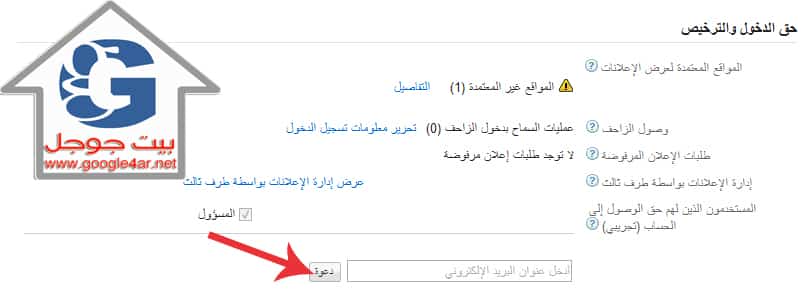
خدمة جديدة مازالت تحت التجربة وسنطرق اليوم شرح كيفية استخدام هذه الميزة: يجب أن يكون لدى المستخدمين حساب Google ليتمكنوا من الدخول إلى حسابك لمنح حق الوصول إلى حسابك: سجِّل الدخول إلى حسابك في AdSense.
انتقل إلى علامة التبويب الصفحة الرئيسية ، ثم
إعدادات الحساب
في اللوحة اليسرى. ضمن “حق الدخول والترخيص” في قسم “المستخدمون الذين لهم حق الوصول إلى الحساب”، يرجى إدخال عنوان البريد الإلكتروني للمستخدم الذي تريد مشاركة حسابك معه، ثم انقر على دعوة .
تتم إضافة المستخدم إلى جدول “المستخدمون الذين لهم حق الوصول إلى الحساب” وتكون حالته “معلق”. منح حق الوصول لحسابك في AdSense 4.
وبعد قبول المستخدم لدعوتك عبر البريد الإلكتروني عن طريق النقر على الرابط الوارد في رسالة البريد الإلكتروني وربط حساب Google بحساب AdSense المسرد في الدعوة، سيتم إزالة حالة “معلق” من جدول “المستخدمون الذين لهم حق الوصول إلى الحساب”. على الرغم من أنه لا يمكنك تعيين مستوى الدخول للمستخدم في رسالة البريد الإلكتروني، إلا أنه يمكنك تغيير مستوى دخول المستخدم في أي وقت. إذا كنت تتمتع بحق دخول المسؤول، فيمكنك تغيير مستوى دخول المستخدمين في أي وقت، حتى إذا كانت حالتهم هي “معلق”.
مالك الحساب هو المسؤول الوحيد عن الخصائص في برنامج AdSense وعلى المسؤولين الحذر عند منح مستخدمين حق الوصول إلى حساب. يجب أن يلتزم كل المستخدمين المضافين إلى حساب بـ سياسات برنامج AdSense .
أتمنى أن يكون الدرس قد أضاف بعض الخبرة لمستخدمينا العرب في طرق التعامل مع برنامج AdSense
#GoogleAdSense #حسابادسنسمتعدد #منححقالوصوللحسابكفيAdSense
دروب أيديا - DROPIDEA
نأمل أن تكون هذه المقالة قد أضافت لك قيمة حقيقية. في دروب أيديا نسعى دائمًا لتقديم محتوى عربي عالي الجودة يساعدك على النمو والتطور في المجال الرقمي. تابعنا للمزيد من المقالات والشروحات المفيدة.
الأدمن
DROPIDEA
أحدث المقالات

هل تصيّد ماسك إطلاق أداة «Dots» من OpenAI عبر نطاق dot.com؟

بيك إكس في ترفع سقف استثماراتها البذرية إلى 5 ملايين دولار

عشاء مرتقب بين رئيس أنثروبيك ودونالد ترامب وسط خلافات حول أمان الذكاء الاصطناعي

جوجل تختبر الشراء المباشر من فليبكارت عبر Gemini في الهند



